
Any file that you link to or display on your website, be it a Word document, a PDF, a photograph, an image, or an audio or video file need to uploaded to the WordPress media library on your website. When they are uploaded, they are assigned a unique website address (URL) which can be used to access the item. The various types of item often determine the way they are used on the website. The Media files section of the left sidebar menu provides access to all of these components and can itself be accessed from different places within WordPress, in addition to the left sidebar menu. Here are some features to keep in mind when working with media files, including third-party video files you may embed on your website.
Image Sizing and Optimization
While it can be tempting to take any image, upload it to the web (or WordPress Media Library) and try to add it to a website in an unedited or unoptimized “raw” form, the results can often be less than…
Media Library Main Screen
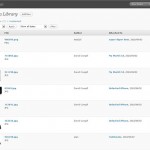
The Media Library main screen can be accessed from the left sidebar menu and selecting either “Media” or the “Media Library” sublevel under it. When you go to this page it will look something like this. On some installations, pictures…
Working With Media Files in Pages and Posts

Most often, you will be working with media files when you are adding them to pages and posts either as text links, or as images in the body using the WYSIWYG Editor or as a featured image, and sometimes in…
File Size and Security Limits
There is a set file size limit and files greater than that limit cannot be uploaded to the media library. Additionally, certain unusual types of files (certain image or document formats) are not permitted in the media library due to…
Making Embed Videos Mobile-Friendly
When you embed videos using code provided from one of the third-party video services (e.g. YouTube, Vimeo, etc.) the embed code may not provide the proper code needed to make sure the video does not overflow the borders of the…
Images and Accessibility
There is an increasing need with the variety of browser options available and the need to properly tag visual items on the web with appropriate descriptions that it is necessary to consider a few points when uploading images to the…

